Welcome to Typography Tuesday or Type Tuesday for short!
Every Tuesday, we’ll be exploring typography and the use of type in the modern-day language, delving into the various design nuances. Some of these you may know, while others may have been forgotten as we have evolved into the digital era.
Our design ethics are built on years old ‘typographic’ foundations. Type is everywhere, from magazine ads and tube posters to social media graphics. It drives visual communication, influencing how we connect and engage with what we are reading. In fact, we have worked in this industry for over thirty-five years, and we love type so much that we wanted to share some of our favourite ones. We hope you enjoy our top tips for tip-top typography
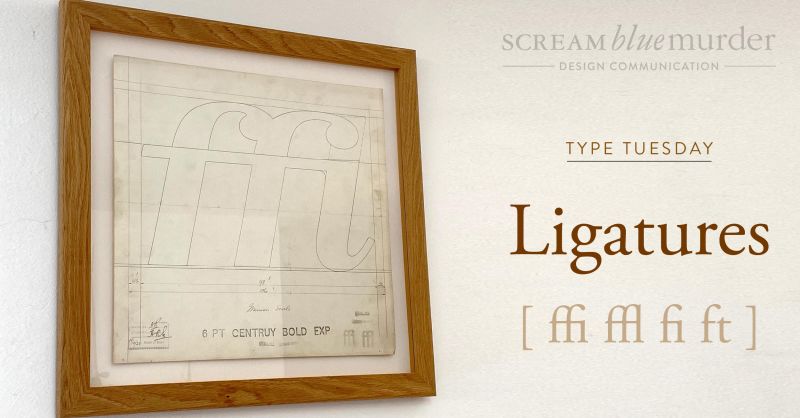
Today we talk ‘Ligatures.’
‘Ligature’ comes from the Latin word ligatus, meaning to tie or to bind.
Designer Ben Casey from The Chase Creative Consultants shares his thoughts around typography as ‘the voice of the written word.’ However, he feels that there ‘comes a danger that the very foundations on which the subject was built could simply be forgotten.’
Typography – What is a ligature?
Casey describes a ligature as ‘two or three letters crafted into a single character.’
Typography – What are the most common ligatures?
‘f’ and ‘i’ and ‘f’ and ‘l’ are the most commonly used.
Typography – When do you use a ligature?
Sometimes in a text setting, the dot on a lowercase ‘I’ can clash with the terminal of the ‘f’. So wherever possible, you would use a ligature to avoid the clash. It’s the invisible skill that makes the type easy to read.
We don’t whisper your story. We Scream Blue Murder.
Business owners and leaders are constantly learning new things and as a relatively recent business owner I am no exception. I am always seeking advice, and trying to find the best people to help me make the business a success.
A great example is marketing. Coming from a technical and consulting background, this is not really my area of strength. Don’t get me wrong, I’ve picked up a lot over the years, and I’ve managed, through luck or judgement or some combination of both to do enough to get the business into a pretty good place in our first three years. But when it came to the point where we decided to put some real focus on our marketing, I wasn’t really too sure where to start.
Clearly there are many aspects to marketing a business, whether you’re new or established. I knew I needed some help, but to whom should I turn? Should I employ someone, or use an agency? Should I look for a generalist, or a specialist (or a number of different specialists)? I know that I prefer working with specialists, but if I pick a specialist in one area, am I neglecting other important areas?
The problem, for me, was that not having sufficient experience or knowledge of the area that I needed help with, I wasn’t sure how to articulate exactly what help I was looking for.
I didn’t know what I didn’t know.
Fortunately, I managed to find my way through this with some advice from friends in the field, and some trial and error, and I’m confident that we’re now on the right track. However, if there had been a course or workshop that I had come across that would have helped me figure out the key areas that I needed to consider, key questions to ask myself and guide me towards some priorities, I would definitely have jumped at that. I’m sure they exist; I just didn’t find them.
When it comes to Cyber Security and managing the risks to a business, I frequently see exactly the same scenario. Business owners, and senior management teams know that their business is at significant risk from Cyber Attacks, ransomware, email-based fraud and similar, and many know they need help. Their IT department, or external IT provider looks after some of the technical aspects of security but they’re often not specialists in security – they’re typically more focused on keeping the lights on and implementing new technology to help the business stay ahead. Rightly so. The owner, or leadership team, however, has this nagging feeling that they should definitely be doing more. They know they need some help.
The point of the one-day training workshop is not to make you a security expert. It’s not designed to scare you into buying services from us (although it might scare you a bit). It’s purpose is to help you understand what you don’t know – what’s important, what to look at and prioritise when it comes to security, and where to go for help that you can trust. But it’s more than just telling you.
Yes, we provide you with lots of information, all geared towards owners and senior management teams, but it’s a bit of a whirlwind “voyage of discovery”. Through carefully designed exercises and discussions, we’ll help YOU discover how to determine what is important to your business, how to assess risks and impacts in a security context, and how to build a strategy and plan to improve security and reduce business risk.
Want to find out more? You can contact us to talk through your needs or alternatively go online and book yourself on to the next available course.
Marketing – how to tap into the needs of your customers
It was my turn to make team drinks in the office today. We had one black decaf coffee, one regular black coffee and one tea with milk. All were different, made to the specific needs of each team member. I knew who drank what and how they liked their drink to be made.
That made me think about marketing. As businesses, do we need to know that level of detail about our customers? I’m not necessarily thinking about how they like their drinks, but what products or services do they need right now, and how do we use that information to shape our marketing?
Actually, knowing how your customer likes their tea is also important. Should they visit you, you can remember how to make their perfect cuppa! They will feel recognised and appreciated and not just like another customer.
Marketing – are you checking into your customer’s needs?
A really useful blog by Hubspot identifies 16 of the most common types of customer needs. Whether you are a business that sells products or offers services, these 16 needs work together to drive customers to purchase from you rather than going to your competitor.
How many of these do you know for your customers?
1. Functionality – does your product/service function in the way they need it to solve their problem?
2. Price – does the cost of your product/service fall within their budget?
3. Convenience – does your product/service provide a convenient solution for them?
4. Experience – does your product/service provide a great user experience?
5. Design – is the design of your product/service easy to use and intuitive?
6. Reliability – is your product/service reliable, and does it function as advertised?
7. Performance – does your product/service perform so the customer can achieve their goals?
8. Efficiency – is your product/service efficient and not time-consuming?
9. Compatibility – is your product/service compatible with what the customer is already using?
10. Empathy – when your customer gets in touch with a problem, are you empathetic and understanding?
11. Fairness – from your pricing to contracts and customer service, are you a fair company?
12. Transparency – are your pricing changes, ethics, and processes for problem-solving transparent?
13. Control – do your customers feel in control of their interaction with you from the start?
14. Options – do you provide product/service options or payment options? Do you provide freedom of choice?
15. Information – is there regular communication with your customers, so they feel they have all the information they need?
16. Accessibility – can your customers access customer support when they need to?
Adapting our services based on need.
It’s the same with our services. Over time, our clients have asked us for x, y and z. We have now taken on board their feedback looked at our customer service data, and created design, website and marketing packages built around what they have been asking for. We can also create custom teams incorporating subject matter experts should our clients want a bit of a, b or c added in for good measure!
So, what has this got to do with making a cuppa? We listened to what they wanted and developed it for them…just like making a cup of tea. If you asked for decaf coffee and I made you tea with milk, would you drink it? As Steve Jobs notably stated, ‘You’ve got to start with the customer experience and work backwards to the technology.’
That’s what we do at Scream Blue Murder.
We don’t whisper your story. We Scream Blue Murder.
Virtual meetings – do they make us more or less punctual?
Before virtual meetings, remember when we had a meeting in our diary where we had to travel to meet someone? I dressed smartly to meet a potential new client or associate, allocating time in my diary to prep ahead of the meeting and travel to the location. The address was in my GPS, and off I headed. Time was precious, and I was keen to have a good conversation before heading to the next meeting. Arriving early was always part of my agenda, to prepare my thoughts, check my phone for any urgent messages, initiate airplane mode and then off I went…..
Then along came the Covid-19 pandemic and things became very different, increasingly baffled at how some people arrived late for a virtual meeting or had to leave early, not notifying the host ahead of time at the start. These were business meetings, after all!
I got used to checking my technology – could I hear and be heard? Did the lighting wash me out or leave me in the dark covered in shadows? I dressed for business, even though my choice of attire was a little more relaxed but still smart. I always checked I looked fresh and presentable, adding 10 minutes between calls to freshen up, take a comfort break and make a cuppa.
Hydration became more important as I was astounded at how thirsty I was! Furthermore, my one water bottle grew into two, always topped up to quench my thirst. Above all, my overall etiquette has not changed. I still arrived a few minutes early, joining the waiting room, clearing my mind and ready to tune in to new conversations. Just as important, my mobile is still set to airplane mode even though I haven’t even left the house! I feel it would appear rude to my meeting colleagues if it were set to anything else.
Our quick guide to virtual meetings
I surveyed everyone in the office to capture some of their Zoom practices before they hop on to calls.
· Hydration! Hydration! Hydration!
o A freshly made cuppa or water refill ready to go
· Know your agenda
o What is your meeting topic, outcomes and timescales?
· Who are you?
o Introduce yourself and ask others to do the same if you don’t know them.
· I’m on mute!
o Pop yourself on mute when you are not speaking, so you don’t accidentally interrupt someone
· Lights, Camera….Test – before Action!
o Does your camera, mic and internet work? Are you sitting in a good light? What is in your background? Do you need to tidy up?
· Look the part
o Dress well with a paired down version of what you would wear in an office
· Stay in the moment
o Focus on people and what is being said. Don’t be tempted to check your inbox, as we can all tell what you are doing!
· Sign off well
o Summarise the points of discussion, any actions and follow up with an email to all participants
· Stretch!
o Sitting still for too long is no good, so we stretch between meetings!
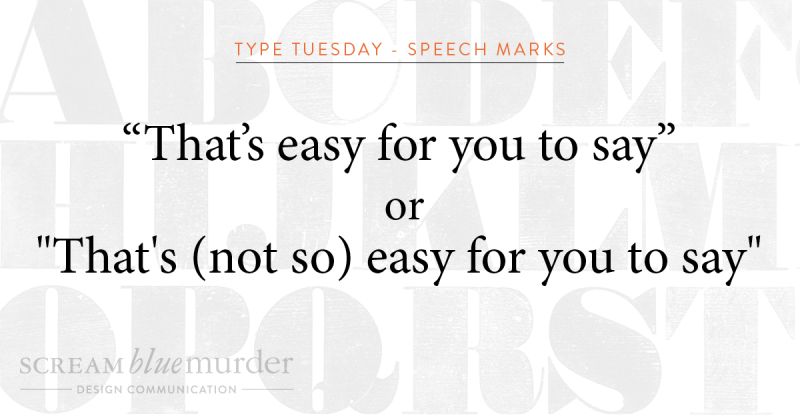
Straight or curly? Today we are talking about the use of straight quotes or curly quotes as used in typography.
Straight quotes or dumb quotes
Straight quotes are straight and vertical. Whether used as a single or double, they often indicate feet and inches and should never appear in documents unless they refer to these measurement units. Moreover, proper typography never uses this type of quote mark, and according to Typewolf, they are left over from the age of typewriters. When the typewriter was designed, the curly shape took up too much space, so instead, the quote marks were made straight.
Curly quotes or smart quotes
Curly quotes (also known as smart quotes) are often the typographers’ preferred mark of choice and are the ideal form of quotation marks and apostrophes. They are curved and will never point straight down unless part of the typeface design. Smart quotes make the text more legible on a page, creating more space, matching the other characters better, and, in fact, traditional printing still uses these quote marks.
How to turn smart quotes on
n writing this blog, I found that my curly quotes were already turned on, but if your PC or Mac is set to straight quotes, here are some instructions to turn them on.
In Word
1. File
2. Options
3. Proofing
4. AutoCorrect Options
5. AutoFormat As You Type – check or uncheck the box ‘Straight Quotes with Smart Quotes.’
In Mac OS Word
1. Word
2. Preferences
3. AutoCorrect
4. AutoFormat As You Type – check or uncheck the box ‘Straight Quotation Marks with Smart Quotation Marks.’
In Adobe InDesign
1. Preferences
2. Type
3. Check the box – ‘Use typographers quotes.’
So, now you know what to do. Are you going to change your straight quotes to curly ones?!
We don’t whisper your story. We Scream Blue Murder.
Many complex decisions around typography determine how the text looks on a page and ultimately affects the outcome of the design. Indeed, how often do you pay attention to the spaces between letters and words?
When looking at typography, good or bad spacing can make all the difference when reading a text accurately and efficiently. Get it right and create space on the page; the letters and words can breathe. As a result, the text is more appealing to read, being more attractive to your reader and kinder to their eyes.
What is leading?
Leading is the amount of space between lines of text. It is measured from baseline (the imaginary line on which a line of the text rests) to baseline. In our age of digital design, leading is also known as line spacing or line-height.
According to Shillington, leading is actually an old term. It is taken from the early days of printing and typesetting, where all typography was typeset by hand, using individual characters made of wood or metal. Lines of space were added between each line of text by strips of lead, giving the lines of text space to breathe – hence the term! Unfortunately, typesetting by hand is now a rare occurrence. Significantly fewer companies use those skills today (we are very lucky to have one on our doorstep), but the term remains.
How to use leading in your typography
To summarise, leading is one of the simplest tools to use to make your design look better.
If it’s too tight, the text will appear cramped with your readers squinting to read it.
Too open and the reader will get lost trying to navigate the large gaps between the letters and lose track of where they are in the sentence.
So, try to:
· Use looser leading for body copy
· Use tighter leading for headlines
· Test different leading heights
We don’t whisper your story. We Scream Blue Murder.
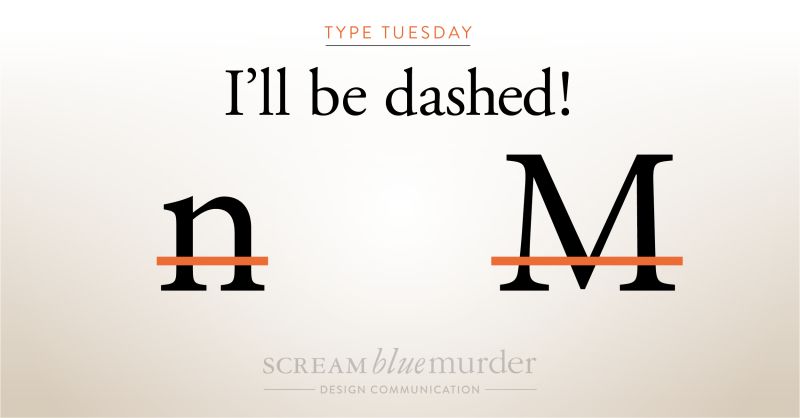
The use of dashes and hyphens is often inconsistent in writing. These typography elements are easy to find on a keyboard, but did you know that they are actually three different horizontal marks of different lengths and uses?
They are called the hyphen, en dash and em dash.
In fact, each has a different role and function from the other and, when used correctly, provide that extra bit of punctuation and sharpness to your text.
Typography: What is a hyphen?
Hyphens link words or indicate a break in a word at the end of a line. It is the shortest of the three marks and is used to combine words. It is used to connect numbers, like for a phone number, but does not indicate a range of numbers; this is the job of an en dash.
Hyphen examples include:
444-654-896
It’s all about the hands-on experience of setting metal type.
Typography: What is an en dash?
The en dash (approximately the width of a lowercase ‘n’) indicates a range of values or a connection between two things such as numbers, people or places. It is slightly longer than the hyphen but not as long as the em dash.
En dash examples include:
1200-1400
The Edinburgh–London train is ready to depart.
Typography: What is an em dash?
The em dash (approximately the width of a capital ‘M’) marks an abrupt change of thought or a transition within a sentence. It is noticeably the longest of the three marks.
Em dash examples include:
I wish you’d —oh, never mind.
Ripe, juicy strawberries—such as the ‘Sparkle’ variety—are perfect for jam making.
According to ‘Type Matters’ by Jim Williams, they are also referred to as ‘nut dash’ and ‘mutton dash’ respectively.
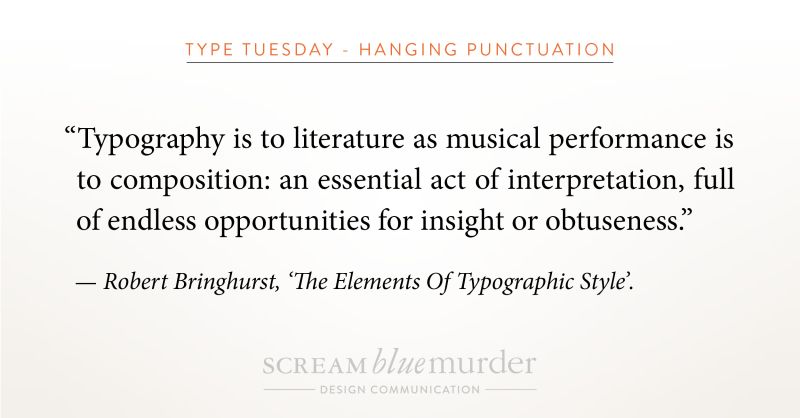
To hang or not to hang…? That is today’s question as we investigate hanging punctuation!
Actually, we are exploring if opening punctuation marks should sit outside a body of type or should they align with the type?
Hanging punctuation – what is it?
Hanging punctuation is a method of setting the opening punctuation marks outside the margins of a body of type. As a result, it creates a uniform edge, giving it a much cleaner, sharper alignment and feel for easier, uninterrupted reading. Conversely, when punctuation isn’t hung, it creates a visual indent that distracts the eye and makes the type look sloppy and harder to read. It can be applied to any body of text, whether left justified, right justified or fully justified.
According to Wikipedia, it is so-called because the punctuation appears to land in the margin of the text and is not incorporated into the block or column of text.
Hanging punctuation – where did it originate?
As it happens, German inventor, printer and publisher, Johannes Gutenberg developed this style of punctuation when creating his Bible in the 1400s.
How to design hanging punctuation in In Design
InDesign provides great tools for creating hanging punctuation in the bodies of text. We thought we’d share our handy tips on designing hanging punctuation using this software as we use this in the office. So, please take a look at our video or check out the four steps below.
1. Highlight text
2. Menu >Type>Story
3. Check ‘Optical Margin Alignment’
4. Click the icon next to the form field for ‘Align based on size’ or manually input a size until it looks right!
(Insert Video)
We don’t whisper your story. We Scream Blue Murder.
How often do we sit and completely immerse ourselves in birdsong, tapping into our senses and tuning in to what is happening around us? We stop, we take notice, and we listen to the nuances of the plethora of sounds clamouring for our attention.
They are songs for attracting a mate, communicating danger, advertising territorial boundaries, raising the alarm, identifying breeding grounds and defending families, to name just a few.
Each has a distinct bandwidth, length, pitch and complexity, communicating key messages exactly when they should be heard. There are even different dialects.
Birdsong is a communicator – so is marketing
Marketing is about touching your market at the right time with precise messages. Messages pitched at the right level, containing the right words and sprinkled with emotion to make your customers stop, think and engage.
The trick is to create marketing messages that rise above the interference and disruption, so they are recognised and heard, telling your story with the correct narrative and expression.
· What do your customers fear?
· What problems do they have?
· How can you help them with your products or services?
Tune out to tune in
Whether you are chirping, tweeting or singing, create attention. Help your customers get to where they want to be by singing different songs and telling unique stories with a specific set of signals that can be recognised. This is your marketing at its best.
Don’t forget, what is not being said is often more important than what is actually communicated.
Marketing messages that work mean your customers can listen above the noise. They can distinguish between the tweeting and chirping of your competitors to hear the one true message, the one message that resonates with them. Yours. Once they have tuned in, they will be able to hear your message time and time again with the utmost clarity, understanding that to get to where they need to be, they need you to help them.
We don’t whisper your story. We Scream Blue Murder.
Digital connectivity, digital funding and innovations in LoRaWan connections across Norfolk are all part of Norfolk County Council’s strategy to make Norfolk the best-connected rural county in the UK.
How can better digital connectivity help your business? This is the question that Norfolk County Council plans to answer with an all-encompassing digital strategy for Norfolk that can help businesses save money, lessen their impact on the environment, achieve business growth and future proof their business.
The digital strategy is in three parts: Making sure that the whole of Norfolk (including rural areas) has digital connectivity with superfast broadband and 5G; the launch of the Go Digital project that helps provide SMEs with funding for digital transformation to increase productivity, recover from the pandemic and grow their business, plus access digital training for their employees; and finally by developing the Norfolk and Suffolk Innovation Network, the largest free-to-use public sector Long Range Wide Area Network (LoRaWAN) in the UK, which delivers dual county connectivity to support Internet of Things (IoT) sensors. The network is an innovation network designed so business, public sector, schools and the general public can all experiment with the technology.
Norfolk businesses are now being asked What could your business do? when it comes to having better digital connectivity and an innovation network of digital sensors that can make almost anything possible.
Businesses who are already seeing what IoT sensors can do for their business include Unitec, Ben Burgess and Gressenhall. The technology network has helped Uniotec kickstart innovation in Norfolk and has helped with their business growth. IoT sensors have also helped Ben Burgess support their Norfolk clients in making cost savings and smart decisions, by helping them monitor crops and livestock. LoRaWAN has also enabled Gressenhall use GPS technology to conduct visitor analysis to improve visitor experience.
Cllr Tom FitzPatrick, Norfolk County Council’s Cabinet Member for Innovation, Transformations & Performance, said: “It is important that our Strategy is not just for the County Council, so we want to make sure that everyone in Norfolk whether residents, businesses or visitors, is able to be given the opportunity to take full advantage of the opportunities and benefits offered by digital technology.
“Digital technology, accessed through fast data or mobile phones is not just something which is nice to have, but is now vital in keeping our essentially rural county at the forefront in terms of both the wider economy, learning and day to day activities.
“Good digital connection is vital and this Strategy, developed by Norfolk County Council is a step towards making Norfolk prosperous and inclusive. This Strategy will help tackle Digital exclusion in Norfolk.
“Our Innovation Network has gone from nothing to the largest in the UK in less than three years and offers existing businesses, entrepreneurs, the care and educational sectors the opportunity to harness a free to use network, which is growing globally.”
The official launch of Norfolk County Council’s digital strategy will take place on 22 September on the Norfolk Chambers of Commerce and Norfolk County Council’s Norfolk Knowledge Hub platform. The Norfolk Knowledge Hub is the place for businesses to find resources on how to implement everything from digital, marketing and brand awareness, through to leadership, finance and environmental strategies.
Cllr Graham Plant, Norfolk County Council’s Deputy Leader and Cabinet Member for Economic Growth said: “Norfolk businesses have an invaluable opportunity to use our new Norfolk Knowledge Hub. Curated by the Norfolk Chambers of Commerce, this platform offers a wealth of free information and advice with a wide range of support programmes and learning resources in a secure, virtual environment.
“It’s a great way to exchange and share knowledge and experiences, new ideas and to create new connections. As we recover from the pandemic, this will complement traditional but currently unavailable physical support. I urge businesses to visit and take advantage of this innovative platform.”
Norfolk businesses who are interested in finding out more about how digital connectivity can benefit their business, including trialing LoRaWAN technology for their business can find more information at: www.norfolk.gov.uk/digital
The official launch of Norfolk County Council’s digital strategy and website will take place on Wednesday 22 September, 2021 online on the Norfolk Chambers of Commerce and Norfolk County Council’s Norfolk Knowledge Hub platform at https://norfolkknowledgehub.co.uk
Businesses can also get involved right now on social media @NorfolkChambers #ArtOfThePossible
Every Tuesday, we’ll be exploring the use of type in the modern-day language, delving into the various design nuances – some which you may know, others which may have been forgotten.
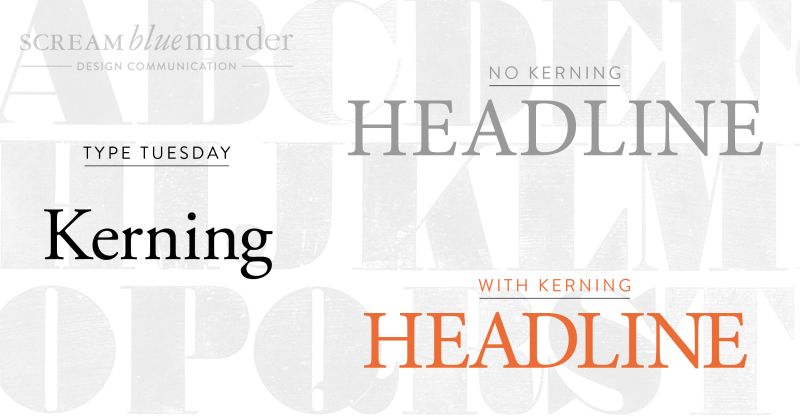
Today we’re talking about the icing on the cake, the finishing touch or attention to detail that, as designers, we notice and use to improve your typography….and that attention to detail is ‘kerning.’
Typography – What is kerning?
‘Kerning’ is the reduction of white space between two characters to create text that is easy on the eye and easy to read. On text applications, kerning usually affects only the character pairs that possess the greatest amount of excess white space, and when used, it creates a more balanced and considered setting. (Reference: Type Matters by Jim Williams
Featured in a blog from Adobe designer Madeline DeCotes, she says, “Kerning is a strikingly subjective artwork. The designer needs to look at the space between each letter in a word and ask, ‘Does this look like enough space? Does this look like too much? Are the letters too tight?'”
Top 4 tips for kerning
Try to kern headlines only, don’t worry about the body text
Print out your work to get a different perspective
If in doubt, turn it upside down to view the spacing between the letters
Imagine you are reading the text in a different language; how does it look?
Benefits of kerning
· It improves the appearance and design of your text
· It’s easier to understand and read
· It makes your text look more visually appealing, polished and professional
Never let it be said we don’t appreciate the value of choice here at 24 fingers (just ask Emma about shoes) but – and we can barely believe we’re about to say this – there are times when having too many options is bad, especially when it comes to using social media platforms for marketing your brand.
When it comes to advertising your business, it pays to be precise. There are lots of platforms that entrepreneurs can use to showcase their wares or services. However, like butter scraped over too much bread, trying to hit them all can be exhausting and do your bottom line no favours. Instead, try the following:
Where are your people?https://giphy.com/embed/331KYDEYvSGNW
Any small business needs a marketing strategy and underpinning every single part of it is a deep knowledge of your customer. As well as their needs and pain points, you must also know which social media platform they spend their time on.
If your market is Gen Z, then you should be hitting Instagram with both marketing barrels, because that’s where 73% of them hang out. On the other hand, 78% of baby boomers prefer Facebook. Target your marketing accordingly and you’ll save time, money and reap the sales rewards.
How’s that content coming along then?https://giphy.com/embed/3rgXBHcd5Lis0J3dp6
It’s all very well knowing where your ideal customers are if you don’t know what content they’re consuming. Do your younger audience members on Instagram want to wade through a blog post about the latest news in your sector, or will your older, Facebook-loving clients be keen on a funky video backed by a hard house soundtrack?
Alternatively, you can ask for feedback:
Look at your metrics to see who is consuming which content and on what platform
Poll your customers and social media visitors to find out what they want to see/read
Talk to your customers as they interact with you – direct questions work
Pick your platform carefullyhttps://giphy.com/embed/d6QleegehJOalRN3PJ
So, you’ve established your ideal customer and found out what they want. Now all you have to do is match it to the appropriate platform – simples.
One of the best starting points is a social media site you’re either familiar with or have had a positive experience with in the past. Use it as a test bed to try new ideas, then use your customer feedback to see how well this content performs on other outlets.
A Facebook video could work well on YouTube and Instagram, for example, while a link to a blog post could engage on Linkedin and Twitter. Play around and see what happens.
Act on your resultshttps://giphy.com/embed/69D4FSNqihhKpFcc1a
The great thing about social media is, even if you’re only operating on one or two platforms, they come with insightful analysis so you can see for yourself what’s happening with your content.
Use those figures to more accurately target your audiences with content you know they’ll lap up and enjoy, and planning your next ad campaign will be a breeze, because you’ll know exactly where you need to be.
If you’re still feeling more scattergun than surgical tool, drop us a line and we’ll help sharpen up that focus.
We’re 24 fingers, a digital marketing agency and a proud member of the 42 Club, Brentwood Chamber of Commerce, Excel Business Networking Group, the Trusted Business Community, the Organisation for Responsible Businesses and the Rotary Club of Brentwood à Becket. We help companies who are all fingers and thumbs with their social media grow their business and brand. Book your free strategy call here.