James Hale, Head of Digital & Marketing, Naked Marketing
Head of Digital and Client Services
If anyone knows the importance of a cross channel approach it’s James. A man with a plan and a thorough understanding of both marketing and digital. James works closely with clients to ensure the success of their marketing plans, goals and strategies.
Clients who get Naked will get noticed. After all, if your marketing doesn’t get noticed you’ll get nowhere. Money wasted – down the proverbial drain!
Our work is the thing we’re most proud of. See what we’ve done for a few of our clients.
With a whopping 20+ years’ experience in the creative industry Dave is a design powerhouse. On top of producing brief crushing work for clients of all shapes and sizes, Dave co-leads the Creative Team and manages the studio. Oh, and he’s our co-founder, without him we quite literally wouldn’t be Naked.
Clients who get Naked will get noticed. After all, if your marketing doesn’t get noticed you’ll get nowhere. Money wasted – down the proverbial drain!
Our work is the thing we’re most proud of. See what we’ve done for a few of our clients.
Whether you’re new to running a business, new to your role, or you’ve been in business for a while and you’re starting to focus on cyber security for the first time, you may have already discovered your first challenge – where to start?
You’ve no doubt heard of common types of cyber threats such as Phishing or Ransomware. These types of threats and the sometimes devastating results feature regularly in the mainstream media when larger organisations we’ve often heard of suffer attacks. But what about your business, your customers, your data? Are you at risk?
Businesses today are facing more frequent, more sophisticated, and more targeted attacks than ever before.
The Government Department for Digital, Culture, Media & Sport released the latest Cyber Security Breaches Survey (link) in March 2021. According to the survey, around 40% of all UK businesses have identified an attack or breach in the past 12 months. This is based on the number of identified attacks or breaches, it becomes more alarming still when we think about the attacks or breaches that were not picked up or identified.
If you’re thinking these figures are inflated by the ‘big target’ enterprises, you may want to take a closer look. Yes, the proportion of larger businesses reporting attacks and breaches is higher- up to 65%. In reality, the types of threat faced and the frequency of attack Is likely to be roughly the same whether you are a large or small business.
‘Phishing’ is becoming the most common form of attack by far with 83% of attacks being identified as such and typically- specific targeted attacks aside- these are sent out by the attacker far and wide, in a ‘scattergun’ approach that does not discriminate based on the size of your business.
So the bad news is that if you use email, you are just at risk as a micro-business as you are an Enterprise. The good news is however, that to defend against the vast majority of phishing attacks you don’t need a huge budget, or dedicated security teams or expensive technology- the most effective form of defence against phishing is awareness and education. According to the survey nearly two-thirds of identified attacks were picked up after members of staff raising the alarm. Making your staff aware of threats, what to look for and what to do (or not to do, which is possibly more important!) if they receive anything suspicious, costs your business relatively little but could save a lot- potentially even the business itself.
Thankfully, UK Businesses are getting better at preparing for and recovering faster from attacks.
The majority of businesses affected by a breach or an attack are able to recover much quicker now than when the survey first measured this time in 2017. 90% say they were able to fully recover from a significant breach within 24 hours, but more impressive than this is that now 72% of businesses were able to recover almost instantly- up from just 57% in 2017.
Preparation is key- knowing your risks, backing up your data, implementing well-versed procedures can all aid fast recovery. Even for small businesses and start-ups where security may not be at the forefront of your thinking, or where you may not have the expertise required in-house to effectively analyse and mitigate your risks, don’t ignore it- there are organisations and government entities like NCSC that exist entirely to help businesses like yours plan for and defend against Cyber threats.
As most data nowadays is captured, processed, stored and exchanged electronically, the issues affecting UK businesses are most often the direct result of some kind of security incident and represent what is commonly referred to as a “data breach”. A data breach can be broadly described as a compromise of either the Confidentiality, Integrity or Availability of data. This can come about in a number of ways such as Ransomware.
Ransomware is still on the rise. Not only that, but concerningly success rates seem to be up. This is not only in terms of the abilities of the Ransomware groups to infiltrate the networks of large, successful and (you might think) well protected companies, but also in terms of increasing likelihood that the victim company will actually pay the ransom.
There are many things an organisation can do in terms of systems, IT infrastructure and software solutions to mitigate the chances of becoming infected by Ransomware, however we would always encourage the covering of basics such as maintaining regular backups of your most important files and data right across your business. Alongside this, one of the most prudent approaches is to defend your business and data in as much depth as possible, making it harder for what does infiltrate your systems to access what is being targeted.
It’s a fact that each business is unique in terms of the cyber risks they face, so preparation is ever more important. Ensuring that your investment is not only in new capabilities, but also in your people will give you some of the best chances of limiting the impact of these two prolific cyber threats.
With a combination of public courses where attendees will be from a range of organisations, and bespoke solutions for your business, we are experienced in ensuring that what we deliver suits the needs of your business.
We are focused on providing cyber security training that also brings personal benefits to individual attendees in their broader lives and not just in the workplace. We do not deliver a standard CBT session or something general, which might feel like a tick box exercise for the business and attendee, we ensure that we are linking the training with your specific process and policies
CyberScale are a Cyber Security Consultancy based in Norwich. If you would like to talk to us about your security position and requirements then please do contact us at [email protected] or call us on 01603 339550.
For many it can be a daunting step to take in starting your cyber security journey when the realisation comes that you need to do more to protect your business, teams and customers from the ever growing risks associated with cyber-attacks. And herein lies an ongoing challenge; many businesses know they need to do something so will often focus on ensuring they have some technical solutions in place such as firewalls, anti-virus software and multi-factor authentication, however this is far from the whole story when it comes to protecting any business.
Quoting directly from the Cyber Security Breaches Survey 2021 published by the Department for Digital, Culture Media & Sport “this…survey continues to show that cyber security breaches are a serious threat to all types of businesses and charities”, going on to say “a sizeable number of organisations that identify breaches report a specific negative outcome or impact. On average, for those that do, the costs are substantial”.
Once a business becomes aware that it needs to take action to strengthen its cyber security there may be an initial panic regarding how to go about doing this, but with a pragmatic risk based approach you will feel less overwhelmed and more in control of what you need to do. Starting your cyber security journey doesn’t need to be something you do in isolation. When businesses work with CyberScale they will typically, within the first year, go through a journey that will encompass much if not all of the following work:
Cyber Security Assessment & Roadmap – looking at where you are today, and what the steps will look like for your business to get you where you both want and need to be, the assessment process will lead in to the development of the Roadmap which will take in to account the risk profile of your business and will enable you to prioritise and plan all required actions.
Cyber Security Strategy – following on from the initial assessment and putting in place a clear roadmap, ensuring that you have a Cyber Security Strategy developed and embedded in to your business is the next step. Within your strategy not only will there be a clear plan on delivering the Roadmap, we will also be looking at your security Policies, your approach to Incident Response Planning and how you are engaging your staff with Training and Awareness activities.
Implementing your plan is a process unique to your business and will often require some oversight and assistance from our team, which is when clients tend to engage with our vCISO service. Delivering the strategy and ensuring that all elements are embedded within the business cannot be where all your hard work so far falls down.
At this point in your journey it may feel like you have achieved all you need to, and you will have indeed achieved a lot, but the fight isn’t over. Cyber threats are constantly changing, with new challenges for even the most security-conscious organisations being realised daily.
By acknowledging that standing still is not an option and that Security is an iterative process, you will always be reviewing, changing and learning your approach to cybersecurity. At this point in your journey we can continue to work with you to ensure you have a process of continuous improvement in place and are always working towards embedding a culture of security throughout your business, working together to guide your Cyber Security Strategy in conjunction with Leadership teams to take the business forward, securely.
What underpins our approach is our belief that effective cyber and information security requires a strategy built around your individual business going beyond technical solutions, you can hear more of our thoughts on this in some other articles on the need for a strategy and guidance for business owners.
CyberScale are a Cyber Security Consultancy based in Norwich. If you would like to talk to us about your security position and requirements then please do contact us at [email protected] or call us on 01603 339550.
Welcome to Typography Tuesday or Type Tuesday for short!
Every Tuesday, we’ll be exploring typography and the use of type in the modern-day language, delving into the various design nuances. Some of these you may know, while others may have been forgotten as we have evolved into the digital era.
Our design ethics are built on years old ‘typographic’ foundations. Type is everywhere, from magazine ads and tube posters to social media graphics. It drives visual communication, influencing how we connect and engage with what we are reading. In fact, we have worked in this industry for over thirty-five years, and we love type so much that we wanted to share some of our favourite ones. We hope you enjoy our top tips for tip-top typography
Today we talk ‘Ligatures.’
‘Ligature’ comes from the Latin word ligatus, meaning to tie or to bind.
Designer Ben Casey from The Chase Creative Consultants shares his thoughts around typography as ‘the voice of the written word.’ However, he feels that there ‘comes a danger that the very foundations on which the subject was built could simply be forgotten.’
Typography – What is a ligature?
Casey describes a ligature as ‘two or three letters crafted into a single character.’
Typography – What are the most common ligatures?
‘f’ and ‘i’ and ‘f’ and ‘l’ are the most commonly used.
Typography – When do you use a ligature?
Sometimes in a text setting, the dot on a lowercase ‘I’ can clash with the terminal of the ‘f’. So wherever possible, you would use a ligature to avoid the clash. It’s the invisible skill that makes the type easy to read.
We don’t whisper your story. We Scream Blue Murder.
Business owners and leaders are constantly learning new things and as a relatively recent business owner I am no exception. I am always seeking advice, and trying to find the best people to help me make the business a success.
A great example is marketing. Coming from a technical and consulting background, this is not really my area of strength. Don’t get me wrong, I’ve picked up a lot over the years, and I’ve managed, through luck or judgement or some combination of both to do enough to get the business into a pretty good place in our first three years. But when it came to the point where we decided to put some real focus on our marketing, I wasn’t really too sure where to start.
Clearly there are many aspects to marketing a business, whether you’re new or established. I knew I needed some help, but to whom should I turn? Should I employ someone, or use an agency? Should I look for a generalist, or a specialist (or a number of different specialists)? I know that I prefer working with specialists, but if I pick a specialist in one area, am I neglecting other important areas?
The problem, for me, was that not having sufficient experience or knowledge of the area that I needed help with, I wasn’t sure how to articulate exactly what help I was looking for.
I didn’t know what I didn’t know.
Fortunately, I managed to find my way through this with some advice from friends in the field, and some trial and error, and I’m confident that we’re now on the right track. However, if there had been a course or workshop that I had come across that would have helped me figure out the key areas that I needed to consider, key questions to ask myself and guide me towards some priorities, I would definitely have jumped at that. I’m sure they exist; I just didn’t find them.
When it comes to Cyber Security and managing the risks to a business, I frequently see exactly the same scenario. Business owners, and senior management teams know that their business is at significant risk from Cyber Attacks, ransomware, email-based fraud and similar, and many know they need help. Their IT department, or external IT provider looks after some of the technical aspects of security but they’re often not specialists in security – they’re typically more focused on keeping the lights on and implementing new technology to help the business stay ahead. Rightly so. The owner, or leadership team, however, has this nagging feeling that they should definitely be doing more. They know they need some help.
The point of the one-day training workshop is not to make you a security expert. It’s not designed to scare you into buying services from us (although it might scare you a bit). It’s purpose is to help you understand what you don’t know – what’s important, what to look at and prioritise when it comes to security, and where to go for help that you can trust. But it’s more than just telling you.
Yes, we provide you with lots of information, all geared towards owners and senior management teams, but it’s a bit of a whirlwind “voyage of discovery”. Through carefully designed exercises and discussions, we’ll help YOU discover how to determine what is important to your business, how to assess risks and impacts in a security context, and how to build a strategy and plan to improve security and reduce business risk.
Want to find out more? You can contact us to talk through your needs or alternatively go online and book yourself on to the next available course.
Marketing – how to tap into the needs of your customers
It was my turn to make team drinks in the office today. We had one black decaf coffee, one regular black coffee and one tea with milk. All were different, made to the specific needs of each team member. I knew who drank what and how they liked their drink to be made.
That made me think about marketing. As businesses, do we need to know that level of detail about our customers? I’m not necessarily thinking about how they like their drinks, but what products or services do they need right now, and how do we use that information to shape our marketing?
Actually, knowing how your customer likes their tea is also important. Should they visit you, you can remember how to make their perfect cuppa! They will feel recognised and appreciated and not just like another customer.
Marketing – are you checking into your customer’s needs?
A really useful blog by Hubspot identifies 16 of the most common types of customer needs. Whether you are a business that sells products or offers services, these 16 needs work together to drive customers to purchase from you rather than going to your competitor.
How many of these do you know for your customers?
1. Functionality – does your product/service function in the way they need it to solve their problem?
2. Price – does the cost of your product/service fall within their budget?
3. Convenience – does your product/service provide a convenient solution for them?
4. Experience – does your product/service provide a great user experience?
5. Design – is the design of your product/service easy to use and intuitive?
6. Reliability – is your product/service reliable, and does it function as advertised?
7. Performance – does your product/service perform so the customer can achieve their goals?
8. Efficiency – is your product/service efficient and not time-consuming?
9. Compatibility – is your product/service compatible with what the customer is already using?
10. Empathy – when your customer gets in touch with a problem, are you empathetic and understanding?
11. Fairness – from your pricing to contracts and customer service, are you a fair company?
12. Transparency – are your pricing changes, ethics, and processes for problem-solving transparent?
13. Control – do your customers feel in control of their interaction with you from the start?
14. Options – do you provide product/service options or payment options? Do you provide freedom of choice?
15. Information – is there regular communication with your customers, so they feel they have all the information they need?
16. Accessibility – can your customers access customer support when they need to?
Adapting our services based on need.
It’s the same with our services. Over time, our clients have asked us for x, y and z. We have now taken on board their feedback looked at our customer service data, and created design, website and marketing packages built around what they have been asking for. We can also create custom teams incorporating subject matter experts should our clients want a bit of a, b or c added in for good measure!
So, what has this got to do with making a cuppa? We listened to what they wanted and developed it for them…just like making a cup of tea. If you asked for decaf coffee and I made you tea with milk, would you drink it? As Steve Jobs notably stated, ‘You’ve got to start with the customer experience and work backwards to the technology.’
That’s what we do at Scream Blue Murder.
We don’t whisper your story. We Scream Blue Murder.
Virtual meetings – do they make us more or less punctual?
Before virtual meetings, remember when we had a meeting in our diary where we had to travel to meet someone? I dressed smartly to meet a potential new client or associate, allocating time in my diary to prep ahead of the meeting and travel to the location. The address was in my GPS, and off I headed. Time was precious, and I was keen to have a good conversation before heading to the next meeting. Arriving early was always part of my agenda, to prepare my thoughts, check my phone for any urgent messages, initiate airplane mode and then off I went…..
Then along came the Covid-19 pandemic and things became very different, increasingly baffled at how some people arrived late for a virtual meeting or had to leave early, not notifying the host ahead of time at the start. These were business meetings, after all!
I got used to checking my technology – could I hear and be heard? Did the lighting wash me out or leave me in the dark covered in shadows? I dressed for business, even though my choice of attire was a little more relaxed but still smart. I always checked I looked fresh and presentable, adding 10 minutes between calls to freshen up, take a comfort break and make a cuppa.
Hydration became more important as I was astounded at how thirsty I was! Furthermore, my one water bottle grew into two, always topped up to quench my thirst. Above all, my overall etiquette has not changed. I still arrived a few minutes early, joining the waiting room, clearing my mind and ready to tune in to new conversations. Just as important, my mobile is still set to airplane mode even though I haven’t even left the house! I feel it would appear rude to my meeting colleagues if it were set to anything else.
Our quick guide to virtual meetings
I surveyed everyone in the office to capture some of their Zoom practices before they hop on to calls.
· Hydration! Hydration! Hydration!
o A freshly made cuppa or water refill ready to go
· Know your agenda
o What is your meeting topic, outcomes and timescales?
· Who are you?
o Introduce yourself and ask others to do the same if you don’t know them.
· I’m on mute!
o Pop yourself on mute when you are not speaking, so you don’t accidentally interrupt someone
· Lights, Camera….Test – before Action!
o Does your camera, mic and internet work? Are you sitting in a good light? What is in your background? Do you need to tidy up?
· Look the part
o Dress well with a paired down version of what you would wear in an office
· Stay in the moment
o Focus on people and what is being said. Don’t be tempted to check your inbox, as we can all tell what you are doing!
· Sign off well
o Summarise the points of discussion, any actions and follow up with an email to all participants
· Stretch!
o Sitting still for too long is no good, so we stretch between meetings!
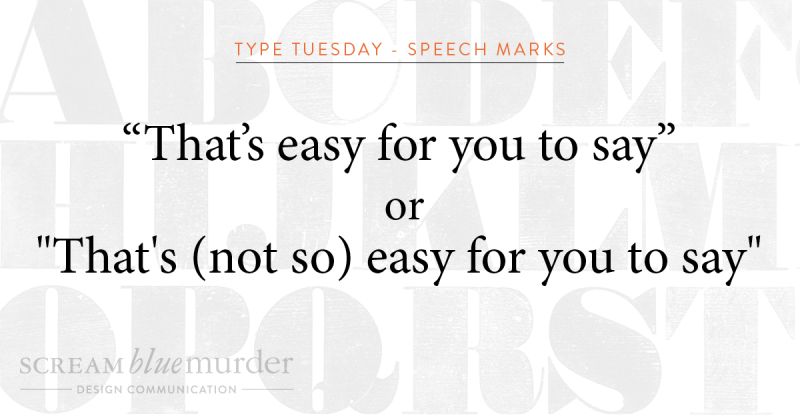
Straight or curly? Today we are talking about the use of straight quotes or curly quotes as used in typography.
Straight quotes or dumb quotes
Straight quotes are straight and vertical. Whether used as a single or double, they often indicate feet and inches and should never appear in documents unless they refer to these measurement units. Moreover, proper typography never uses this type of quote mark, and according to Typewolf, they are left over from the age of typewriters. When the typewriter was designed, the curly shape took up too much space, so instead, the quote marks were made straight.
Curly quotes or smart quotes
Curly quotes (also known as smart quotes) are often the typographers’ preferred mark of choice and are the ideal form of quotation marks and apostrophes. They are curved and will never point straight down unless part of the typeface design. Smart quotes make the text more legible on a page, creating more space, matching the other characters better, and, in fact, traditional printing still uses these quote marks.
How to turn smart quotes on
n writing this blog, I found that my curly quotes were already turned on, but if your PC or Mac is set to straight quotes, here are some instructions to turn them on.
In Word
1. File
2. Options
3. Proofing
4. AutoCorrect Options
5. AutoFormat As You Type – check or uncheck the box ‘Straight Quotes with Smart Quotes.’
In Mac OS Word
1. Word
2. Preferences
3. AutoCorrect
4. AutoFormat As You Type – check or uncheck the box ‘Straight Quotation Marks with Smart Quotation Marks.’
In Adobe InDesign
1. Preferences
2. Type
3. Check the box – ‘Use typographers quotes.’
So, now you know what to do. Are you going to change your straight quotes to curly ones?!
We don’t whisper your story. We Scream Blue Murder.
Many complex decisions around typography determine how the text looks on a page and ultimately affects the outcome of the design. Indeed, how often do you pay attention to the spaces between letters and words?
When looking at typography, good or bad spacing can make all the difference when reading a text accurately and efficiently. Get it right and create space on the page; the letters and words can breathe. As a result, the text is more appealing to read, being more attractive to your reader and kinder to their eyes.
What is leading?
Leading is the amount of space between lines of text. It is measured from baseline (the imaginary line on which a line of the text rests) to baseline. In our age of digital design, leading is also known as line spacing or line-height.
According to Shillington, leading is actually an old term. It is taken from the early days of printing and typesetting, where all typography was typeset by hand, using individual characters made of wood or metal. Lines of space were added between each line of text by strips of lead, giving the lines of text space to breathe – hence the term! Unfortunately, typesetting by hand is now a rare occurrence. Significantly fewer companies use those skills today (we are very lucky to have one on our doorstep), but the term remains.
How to use leading in your typography
To summarise, leading is one of the simplest tools to use to make your design look better.
If it’s too tight, the text will appear cramped with your readers squinting to read it.
Too open and the reader will get lost trying to navigate the large gaps between the letters and lose track of where they are in the sentence.
So, try to:
· Use looser leading for body copy
· Use tighter leading for headlines
· Test different leading heights
We don’t whisper your story. We Scream Blue Murder.
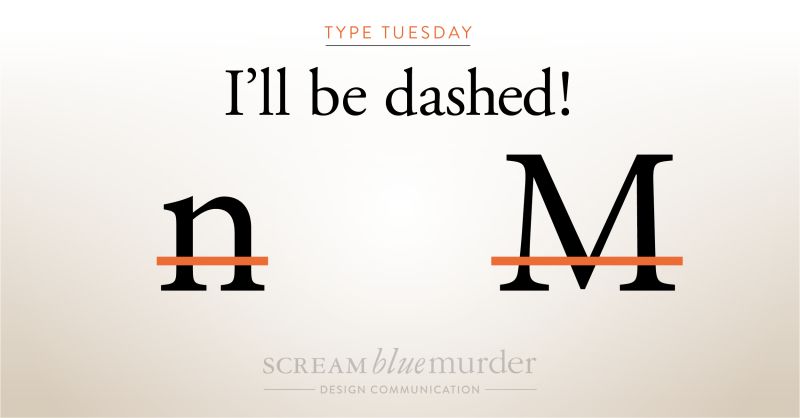
The use of dashes and hyphens is often inconsistent in writing. These typography elements are easy to find on a keyboard, but did you know that they are actually three different horizontal marks of different lengths and uses?
They are called the hyphen, en dash and em dash.
In fact, each has a different role and function from the other and, when used correctly, provide that extra bit of punctuation and sharpness to your text.
Typography: What is a hyphen?
Hyphens link words or indicate a break in a word at the end of a line. It is the shortest of the three marks and is used to combine words. It is used to connect numbers, like for a phone number, but does not indicate a range of numbers; this is the job of an en dash.
Hyphen examples include:
444-654-896
It’s all about the hands-on experience of setting metal type.
Typography: What is an en dash?
The en dash (approximately the width of a lowercase ‘n’) indicates a range of values or a connection between two things such as numbers, people or places. It is slightly longer than the hyphen but not as long as the em dash.
En dash examples include:
1200-1400
The Edinburgh–London train is ready to depart.
Typography: What is an em dash?
The em dash (approximately the width of a capital ‘M’) marks an abrupt change of thought or a transition within a sentence. It is noticeably the longest of the three marks.
Em dash examples include:
I wish you’d —oh, never mind.
Ripe, juicy strawberries—such as the ‘Sparkle’ variety—are perfect for jam making.
According to ‘Type Matters’ by Jim Williams, they are also referred to as ‘nut dash’ and ‘mutton dash’ respectively.
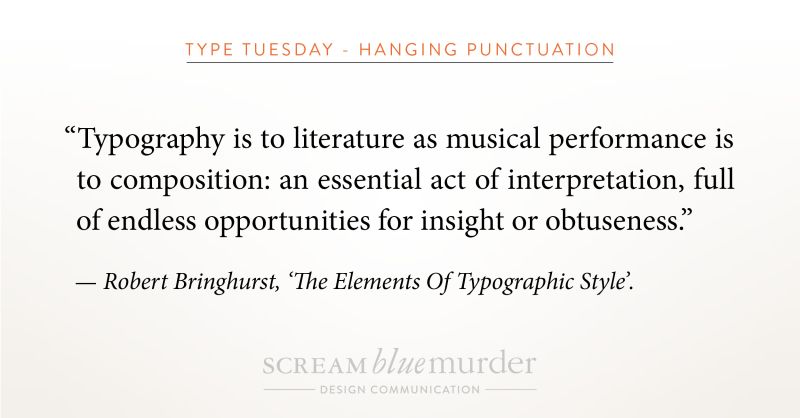
To hang or not to hang…? That is today’s question as we investigate hanging punctuation!
Actually, we are exploring if opening punctuation marks should sit outside a body of type or should they align with the type?
Hanging punctuation – what is it?
Hanging punctuation is a method of setting the opening punctuation marks outside the margins of a body of type. As a result, it creates a uniform edge, giving it a much cleaner, sharper alignment and feel for easier, uninterrupted reading. Conversely, when punctuation isn’t hung, it creates a visual indent that distracts the eye and makes the type look sloppy and harder to read. It can be applied to any body of text, whether left justified, right justified or fully justified.
According to Wikipedia, it is so-called because the punctuation appears to land in the margin of the text and is not incorporated into the block or column of text.
Hanging punctuation – where did it originate?
As it happens, German inventor, printer and publisher, Johannes Gutenberg developed this style of punctuation when creating his Bible in the 1400s.
How to design hanging punctuation in In Design
InDesign provides great tools for creating hanging punctuation in the bodies of text. We thought we’d share our handy tips on designing hanging punctuation using this software as we use this in the office. So, please take a look at our video or check out the four steps below.
1. Highlight text
2. Menu >Type>Story
3. Check ‘Optical Margin Alignment’
4. Click the icon next to the form field for ‘Align based on size’ or manually input a size until it looks right!
(Insert Video)
We don’t whisper your story. We Scream Blue Murder.